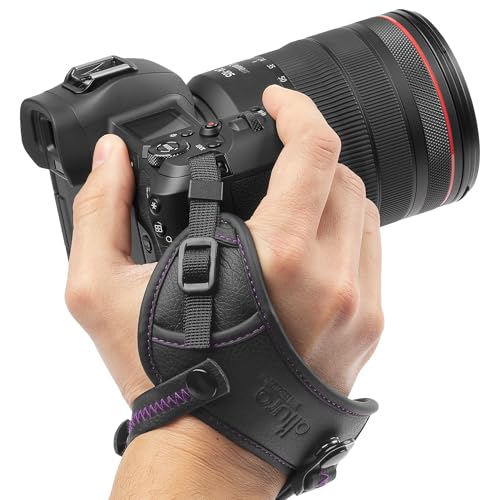
A floating camera strap or grip keeps a camera at the surface if you let go, and gives you a steadier hand-held shot in the water. This hub covers strap and grip styles and how to read a buoyancy rating against your camera's real weight.
Quick answer: a floating camera strap or grip keeps a camera at the surface if you let go. Compare the maker's stated buoyancy with the real combined weight of your camera, housing and mount, because a float that is too small will still let the camera sink. Pick a bright colour you can spot in the water, and use it together with a tether.
Surf camera gear on Amazon
Sponsored
As an Amazon Associate, SurferPix earns from qualifying purchases. See our affiliate disclosure.
A simple foam floating grip for hand-held camera or phone use while swimming or treading water, aimed at reducing the risk of a dropped camera sinking. Buoyancy assumes a specific combined weight from the manufacturer.
Reflects criteria around stated buoyancy rating for a bare camera or phone rather than a heavier housed setup.
A larger-volume floating grip sized to account for the added weight of a housing, aimed at underwater photographers whose camera is already enclosed. Combined weight should be checked against the stated buoyancy rating before relying on it.
Reflects criteria around buoyancy rating specifically for a camera-plus-housing weight range, not a bare camera body.
A floating grip paired with a built-in wrist strap for shooters who want a backup retention method beyond buoyancy alone. Aimed at surf and swim photographers shooting in current or moving water.
Reflects criteria around wrist-strap adjustability and the grip functioning as a backup rather than a sole retention method.
A shaped handle with a trigger-style shutter button for one-handed operation while treading water, aimed at swimmers and bodysurfers who want easier shutter access than a flat grip. Trigger compatibility varies by camera model.
Reflects criteria around trigger-button camera compatibility and the same buoyancy-rating caveats as other floating grips.
A floating camera strap or grip is a piece of buoyant foam or air-filled material attached to a camera so that, if you drop it, it stays near the surface instead of sinking. Straps loop around your wrist; grips are handles you hold, often with a quick-release base that accepts the camera's mount. Both give you a steadier, more comfortable hold in the water, and both are cheap insurance against losing a camera.
They solve a specific problem: many waterproof cameras are not buoyant. Waterproof does not mean floating, and a camera in a housing can be noticeably heavier than the camera alone. A float adds buoyancy and visibility, but it does not add retention. For that you need a tether or leash, which is why we treat floats and tethers as a pair. If you are choosing the camera as well, the waterproof action cameras hub and the surf cameras hub cover that decision.
A float is used together with a tether.
Float options compared
Floating strap and grip options
Option
Good for
Watch for
Floating hand grip
Hand-held water shooting and steadier footage
Check combined camera and housing weight against the stated buoyancy
Floating wrist strap
Backup retention and visibility
Not a replacement for a firm grip or a tether; can tangle
Floating back door or case
Adding buoyancy to the camera body
Model-specific fit; confirm compatibility
Foam float on a lanyard
Low-cost insurance for lighter cameras
Buoyancy varies widely; check the maker's weight limit
Tray with float arms
Housed cameras and lights
Bulk and drag; designed more for diving than surfing
Read the table as a map of trade-offs, not a ranking. A simple foam strap is the right answer for a light camera in shallow water. A hand grip is better when you shoot a lot in the water and want a more stable hold.
How to read buoyancy claims
Buoyancy is a number, and you can check it. A float's buoyancy is the weight it can support while still floating. Compare it to the combined weight of everything attached: the camera, any housing, a mount and a battery. If the total is close to or above the buoyancy, the float will sink or float awkwardly low. Leave a margin; waves, drag and a wet camera make real conditions harsher than a bench test.
Many pages do not state buoyancy at all. In that case treat the product as unconfirmed, and be cautious with claims like "supports any camera". Look for a stated weight limit or a list of supported cameras. Our guides on buoyancy ratings for floating camera grips and added housing weight and floating grip buoyancy show how to do the arithmetic. If a maker does not publish a figure, we do not publish one either.
Add the weights, compare with the stated buoyancy and leave a margin.
How to choose a floating strap or grip
Weigh your kit. Camera, housing, mount and battery together.
Find the stated buoyancy. Compare it with that weight and keep a margin.
Check the camera interface. Grips attach by thread, quick-release or mounting fingers. Confirm it fits your setup.
Pick a visible colour. Bright orange, yellow or red is easier to spot in a swell.
Test the grip. A good handle fits your hand when wet and gloved, and does not twist.
Look at the strap. A wrist strap needs a secure fastener and a quick release if it snags.
Check the closure. Foam or sealed air chambers should be undamaged and free of leaks.
When in doubt, choose the simpler design. Fewer moving parts mean fewer places for salt and sand to jam.
Surf camera gear on Amazon
Sponsored
As an Amazon Associate, SurferPix earns from qualifying purchases. See our affiliate disclosure.
Prices and availability were accurate when retrieved from Amazon and may change. Retrieved Nov 16, 2026.
Using a float safely
A floating grip should never be your only line of defence. Attach a tether from the camera or housing to your wrist, leash or board, so a dropped camera does not drift away in a current. A wrist strap can be a hazard if it snags on a fin or rope, so use a quick-release and practise taking it off. In heavy surf, hold the camera in a way that does not put your fingers between the camera and the board.
Wrist habits matter more than they seem. Always put the strap on before you walk to the water, check the knot or fastener, and keep the loop snug so it does not slide over a wet hand. The guide on wrist strap habits with a floating camera grip lays out a short routine. For tethers and leashes, see the camera straps hub.
Common mistakes
Assuming waterproof means floating. Many cameras sink without a float.
Ignoring housing weight. A housed camera can exceed a float's rating.
Trusting a vague claim. If no buoyancy figure is stated, treat the float as unproven.
Using a float as a tether. It only keeps the camera at the surface; it does not keep it with you.
Choosing a dull colour. A camera you cannot see is a camera you cannot recover.
Forgetting to rinse. Salt in foam, hinges and quick-release parts causes sticking.
Care in salt water
Rinse floats and grips in fresh water after every salt session, working the quick-release and any moving parts under the flow. Dry them in the shade; sun can degrade foam and fade colours over time. Check foam for cracks, crumbling or waterlogging, which reduces buoyancy, and replace a float that feels heavier or softer than before. Inspect straps for fraying and clasps for corrosion.
If your grip has a screw base, check that it is tight before every session, and keep a spare. Store floats loosely rather than crushed in a bag, because compressed foam can lose shape. A written note of when you last replaced foam or hardware helps you swap parts before they fail, not after.
A worked example: checking buoyancy for a housed camera
Imagine you are adding a housing to your action camera and want a floating grip. Start with the weights. Look up the camera's weight on the maker's page, the housing's weight on its page, and add the weight of any mount, battery or light. If a page does not state a weight, you cannot do the sum, and you should weigh the item yourself on a kitchen scale. Add the grip's own weight too, since it is part of the load in your hand.
Now look at the float's stated buoyancy, which is the weight it can support. If the grip is rated for less than your total, it will not keep the rig at the surface; if it is rated for slightly more, it will float low and be hard to see. A comfortable margin is better than a tight match, because waves, drag, and a wet camera all work against you. Where a maker publishes a list of supported cameras but no figure, treat the claim as unproven for housed use and add a second float.
Finally, test it. Put the rig in a calm pool or shallow water, let go, and see how it sits. The camera should stay at the surface with the lens clear of the water and the float visible. If it dips, add buoyancy or reduce weight before you take it into surf. This ten-minute test teaches you more than any specification, and it turns a vague claim into a number you trust.
Questions to ask before you buy
Before you add a float to your basket, put these questions to the maker's page. What is the stated buoyancy, and in what units? Which cameras and housings does it list as supported? What interface does the base use, and does it match your camera or tray? What is the float made of, and does the maker say how it behaves after long sun exposure? Is there a quick release on the strap, and can you operate it with wet hands? Is a spare base or strap sold separately?
If the page cannot answer the first two, the product is unproven for your rig. If it cannot answer the third, you may need an adapter, which adds a joint. Ask also how you will carry it when you are not in the water: a grip that does not fit in your bag tends to get left at home, and a float that stays at home does not float your camera. Finally, consider how the float looks on the surface. A grip that stands upright with its cap showing is easier to find than a flat strap that lies awash in a swell.
These questions take five minutes and save you from the three common disappointments: a float that cannot carry the rig, a base that does not fit the camera, and a strap that is awkward to remove in an emergency. If you would rather start from the camera, the waterproof action cameras hub covers the questions to ask there, and the camera straps hub covers the line that keeps the float attached to you.
Yes. GoPro sells The Handler, a buoyant hand grip with a bright orange base and wrist strap, and the Floaty, a floating case-style accessory. Check the maker's page for which camera models each one lists.
Does the GoPro handle float?
GoPro's listing for The Handler says it keeps the camera afloat if dropped in water and is easy to spot because of its orange cap. A grip's float has a limit, so add up the weight of your camera and housing and compare it with the stated buoyancy.
Do GoPros float?
GoPro sells the Floaty so a HERO camera stays afloat, which suggests the camera is not meant to float on its own. Use a float or buoyant grip and a tether if losing the camera would be costly.